 Beta
BetaWork HIIT
An iPhone interval timer. It floats over other apps during a workout, then maps your Apple Watch heart rate onto each work and rest interval.
- React Native
- Expo
- Swift
- Skia
- HealthKit
- SQLite
- Python
- AWS Lambda
- DynamoDB
- Terraform
The idea
Most interval timers lose the clock when you switch to your music. And an Apple Watch sends heart rate to the iPhone in batches, often minutes late, so a “live” heart rate on the phone is rarely live. I wanted a timer that stays on screen over any app, and a summary that shows how hard each round really was.
What it does
- Presets for Tabata, 20/10, 30/30, 10/20, 1 min / 1 min and the Norwegian 4×4. You can save your own and pick a default.
- Two rings show the whole workout and the current interval. The screen is red for WORK and blue for REST, with beeps before each change.
- A floating pill shows the phase, the round and the countdown while you use another app. A Live Activity in the Dynamic Island is the fallback.
- After the workout, the app finds your Apple Watch workout and maps heart rate onto each interval: the average, the maximum, the highest zone and the time in each zone.
- History stays on the phone. Backup to your own server is optional and off by default.
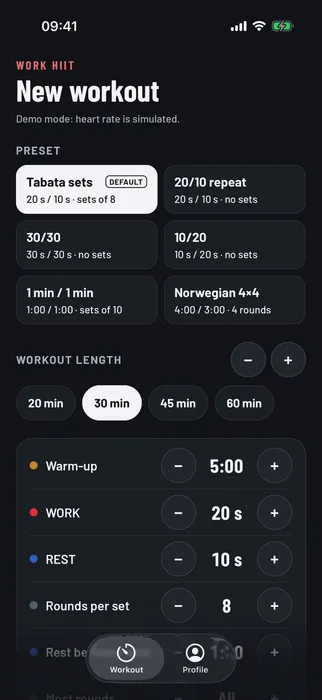
Pick a preset and a length. The plan shows how the rounds fit.
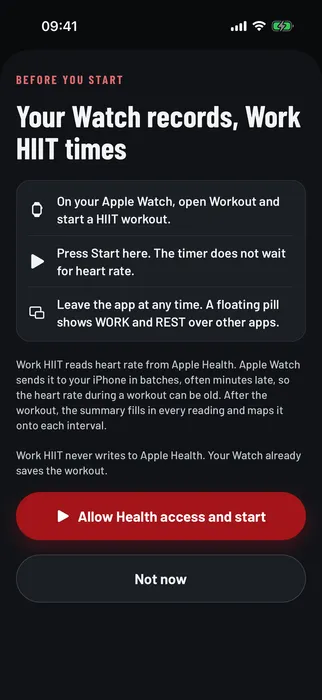
Start the workout on your Watch, then press Start here.
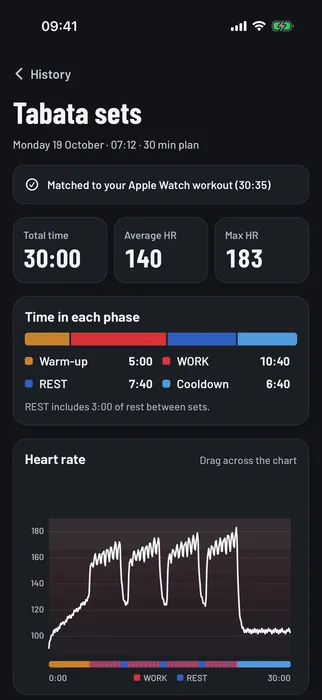
The summary maps heart rate onto each WORK and REST interval.
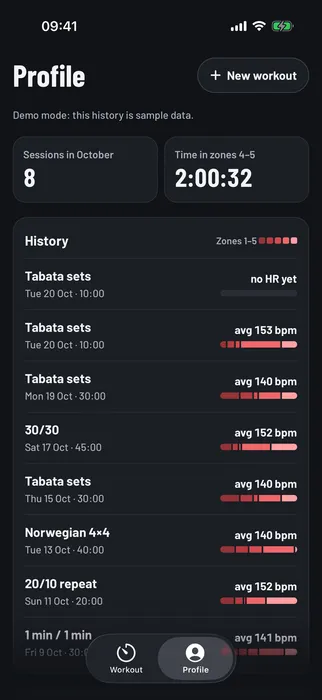
History stays on the phone, with the zones for each session.
How it works
- Plan the segmentsThe timer engine turns a preset into warm-up, WORK, REST, set rest and cool-down.
- Keep an event logStart, pause, resume, jump to cool-down and stop are events. The state at any moment comes from that log and the clock, so a suspended or relaunched app still shows the right time.
- Float over other appsA Swift module draws the pill and runs Picture in Picture. It redraws four times a second.
- Wait for the WatchAfter Stop, the app keeps reading Apple Health until the Watch workout and the last readings arrive.
- Map heart rate to intervalsEach reading lands in its WORK or REST interval by time.
The app is React Native with Expo. Skia draws the rings, and SQLite keeps the history. Two small Swift modules do what React Native cannot: one draws the floating pill, and one keeps the backup key in iCloud Keychain, so a new iPhone on the same Apple ID can restore. The optional backup server is a Python Lambda behind CloudFront, with DynamoDB, set up in Terraform.
What I learned
- Be honest about live data. The Watch does not sync heart rate in real time. So the app shows the newest reading with its age, and fills in the full picture after the workout.
- Store events, not state. A timer built from an event log survives suspension and relaunch, and it is easy to test.
- Some features need native code. React Native covers the screens. The floating pill needed Swift.
- Privacy is part of the build. The app reads from Apple Health and never writes to it. A consent screen, a privacy policy and the App Store privacy labels came with the first version.
What comes next
A device check of the stored heart rate against Apple’s Fitness app, then TestFlight and the App Store.